

Where AP automation stalls, and what an agent restarts

AP automation stalls at four points, usually in order: capture accuracy plateaus once the high-volume suppliers are enabled, matching automation raises the visible exception count, routing and reminders hit diminishing returns, and the configuration set at go-live decays as the business changes. Each shows up in a specific metric, and each responds differently when an AI agent joins.
This wiki covers source-to-pay for a world where AI agents carry the operational load – reading invoices, chasing receipts, working holds – and people keep the judgment calls. The practical guide to AP automation maps the tool market; this page maps where the tools stop, since which stall you are in decides what is worth buying next.
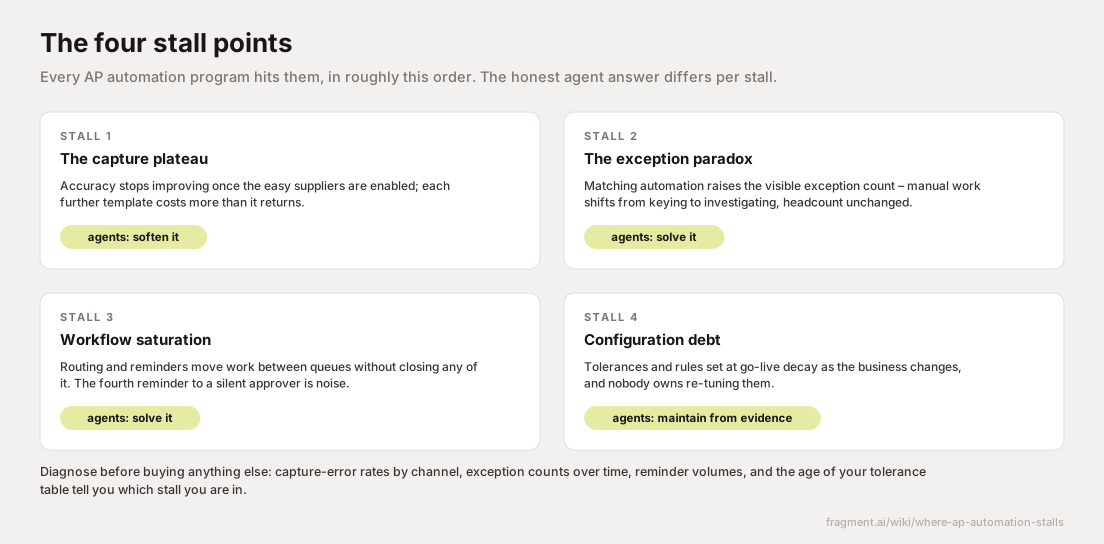
The capture plateau arrives when the easy suppliers run out
Every AP automation rollout opens with the same satisfying curve. Capture – the OCR and e-invoicing layer that turns a PDF or a scan into structured data – improves fast at first, because the first templates cover the biggest suppliers. Take a company with 4,100 active suppliers: the top 80, on EDI or clean PDFs, might cover 72% of line volume. Supplier number 900 sends twenty invoices a year in a scanned layout that changes whenever their billing clerk does; that template costs more analyst hours than the keying it replaces.
You recognize this stall when first-pass extraction accuracy sits flat for two quarters while the enabled-supplier count keeps climbing. The conventional fixes, a newer capture engine or a supplier portal mandate, move the plateau a few points: portals capture the willing, and the long tail keeps mailing PDFs, because a supplier who bills twice a year will never log in.
An agent only softens this stall. A smudged scan stays illegible. What an agent can do is read around capture errors: cross-check an extracted price against the purchase order, and treat a low-confidence field as a question to verify instead of a value to post. The plateau in raw accuracy stays where it was.
Matching automation raises the exception count it was meant to cut
The second stall is the one that gets AP automation programs labeled failures. Before automated matching, a processor would reconcile a $14 freight difference while keying, and no exception was ever recorded. Automated three-way matching – the line-by-line comparison of invoice, purchase order, and goods receipt, the warehouse record confirming what arrived – runs every check on every line, and every automated check is a new way to fail. Tolerance checks (the variance band allowed before review), duplicate detection, and tax validation each add their own hold codes.
In practice, a plant processing 6,200 invoices a month can hit a 68% touchless rate – invoices posting with no human touch – while flagged holds triple, from the 150 a month the old process recorded to 540. Invoice quality held steady; the checks a person once applied selectively now run on everything. The AP team stops keying and starts investigating invoice exceptions, headcount unchanged, and the leadership dashboard reads the rising queue as the automation failing. Each hold traces to an upstream cause, cataloged on why invoice exceptions happen.
The conventional fixes are widening tolerances or adding a triage tier. Widening tolerances lowers the count by paying variances unexamined; a triage tier adds a queue in front of the queue. This is the stall an agent addresses in full, because a flagged hold is an investigation with a verifiable end state – why does the invoice say $3.12 per unit when the PO says $2.95 – and investigation is the work agents do. The checks keep firing; the queue stops accumulating because each flag is worked to closure.
Reminders and routing move work between queues without closing any of it
The third stall hits the workflow layer, the part that decides who sees a hold and when to nudge them. The first escalation rule cuts approval cycle time. By the fourth reminder to a silent approver, the reminder is noise. A reminder is a touch generator: it produces an open, a read, and a deferral while the invoice ages. The approver defers because acting means finding the goods receipt, checking the contract, and asking the requestor what arrived – work no notification reduces.
You recognize saturation when invoice aging goes bimodal – holds either clear inside two days or sit past thirty – and touches per exception climb while the closure rate stays flat, with the exception routing table sprouting ever more escalation rules. The conventional fix, more workflow, underdelivers because the bottleneck is a missing piece of information; every new rule moves the hold faster between people who do not have it.
Agents address this stall in full, closing the loop rather than nudging it: an agent pulls the receipt from the plant system, drafts the supplier query, and hands the approver a one-minute decision with the answer already assembled. The fourth reminder disappears because the third touch resolved the case.
Configuration decays into automating yesterday's operation
Tolerance tables, routing rules, and GL coding rules were tuned to the business as it stood at go-live; the business moves. A 2% or $100 tolerance set when freight rates were stable now trips on every import invoice because carrier surcharges shifted. A routing rule still sends chemical-category holds to a buyer who moved to sourcing eighteen months ago. No one owns re-tuning, so the system keeps automating last year's operation.
You recognize configuration debt when the override rate climbs, the same supplier trips the same check every month, and the change log on your match tolerances and thresholds is empty since go-live. The conventional fix, a periodic configuration review by the original integrator, helps for a quarter; the tables resume decaying the day the engagement ends.
An agent addresses this stall partially. Working the live queue, it sees the decay as evidence: after clearing the same clause-driven price variance forty times for one supplier, it can propose a supplier-specific tolerance; after re-routing the same orphaned holds every week, it can flag the dead routing target. Proposing is where its authority should end – tolerances and approval delegation are control decisions, and people keep those. The debt accrues more slowly and surfaces sooner; someone still has to approve the re-tune.
Run the diagnosis in order before buying anything else
The four stalls produce similar top-line symptoms – a flat touchless rate, a stubborn queue – so the first job in rescuing an AP automation program is telling them apart, with data you already have:
- Cut touchless rate by supplier volume decile. Top deciles touchless while the tail stays manual is the capture plateau; further template spend earns tail-sized returns.
- Chart exceptions flagged against exceptions closed, by month. Flags rising while closures run flat is the paradox: the automation finds work faster than the team can investigate it.
- Count touches per closed exception. More than three, with reminders in the mix, is saturation – activity on cases whose blocking question nobody has answered.
- Date-stamp every tolerance, routing, and coding rule. Anything untouched since go-live is configuration debt; your recurring hold codes will map onto it.
Money aimed at the wrong stall restarts nothing: buy a new capture engine for a queue stuck at stall two and the queue will grow, because better capture feeds the matching engine more lines to check.
Fragment builds AI agents for the stalls that are investigation work: they work the exception queue to closure with evidence attached, chase down the silent approver's blocking question, and propose configuration re-tunes from what the live queue shows – inside the SAP or Ariba environment you already run, with no rip and replace. The workflow catalog lists the queues agents handle, and a demo shows one restarting a stalled case.