

The AP automation stack: four layers, and the one agents add

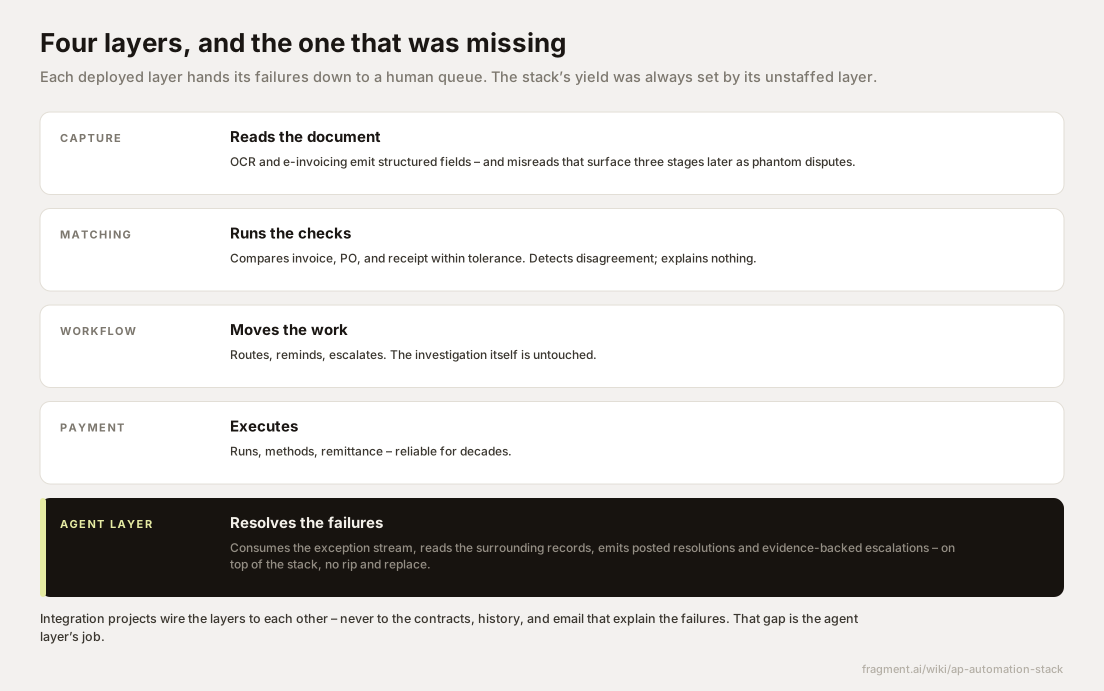
The AP automation stack is the sequence of software layers a company deploys to move a supplier invoice from arrival to settlement: capture, which converts documents into structured data; validation and matching, which tests that data against purchase orders and receipts; workflow, which routes whatever fails and chases approvals; and payment, which executes and records the settlement. Each layer consumes the output of the one below it and hands its failures to a human queue. AI agents now add a fifth layer, resolution, the only one whose job is to work those failures rather than pass them along.
This wiki covers source-to-pay for teams where agents carry the operational load – extracting fields, running matches, investigating mismatches – while people keep the judgment calls. A vendor glossary presents the four layers as a checklist of modules to buy; this page treats them as an anatomy: what each consumes, what it emits, what it retired, and what it still drops on your staff.
Capture emits structured data and a quiet error stream
Capture consumes invoices in whatever form suppliers send them: PDFs attached to email, portal uploads, EDI (structured electronic documents exchanged system to system), paper, and government-mandated e-invoices that arrive already structured. It emits a normalized invoice record – header fields like supplier, date, and totals, plus quantities, prices, and descriptions at the line level.
What capture retired is real: manual keying is gone, and with it the transposition errors and the two-day lag between an invoice arriving and existing in any system. Its residue has a specific profile. Extraction handles clean documents well and degrades on the messy tail – multi-page freight bills, handwritten annotations, supplier line descriptions that share no vocabulary with the PO, unit-of-measure ambiguity between "EA" and "CS". The dangerous part of the profile is silence. A misread field is emitted with the same confidence as a correct one, and the damage surfaces two layers later as a match failure nobody can explain from the invoice image. Our page on OCR and invoice capture draws the line between extraction and interpretation.
Matching sets the yield of the AP automation stack
Validation and matching consumes the captured record plus the purchase order and, in a three-way match, the goods receipt – the warehouse record confirming what physically arrived. The engine may be ERP-native, as with SAP's invoice verification logic, or built into the AP tool, and it applies tolerances: the variance a company accepts before requiring review, typically a percentage with an absolute cap.
Matching emits two streams. Invoices that agree within tolerance post untouched – touchless processing – and flow straight toward payment. Everything else becomes an invoice exception carrying a hold code. It retired line-by-line human comparison, arithmetic checks, and most duplicate screening. Its residue is the entire exception stream, plus the coding burden for invoices that never had a PO and need GL coding before they can post. One property of that residue shapes everything downstream: a hold code names the symptom and says nothing about the cause. The yield of the whole AP automation stack is decided here, because every invoice this layer fails becomes labor.
Workflow moves work without doing any of it
Workflow consumes the exception stream and the company's approval requirements. It emits assignments, reminders, escalations, delegation-of-authority enforcement, and an audit trail of who held each invoice and for how long. This is the layer behind exception routing: it decides which queue a hold code lands in and how loudly to nag.
What it retired is coordination. The paper folder, the lost approval email, the mystery of who has the invoice – all gone, and the visibility it created is why AP leaders can quote their aging numbers at all. Its residue is the work itself. Every exception it routes arrives in a queue as an unstarted investigation: someone still opens the ERP, checks receiving, emails the supplier, reads the contract. Workflow is honest plumbing, measured in time-to-assign, and it made the backlog visible without making it smaller.
Payment is the mature layer because judgment happens upstream
Payment consumes approved, coded, matched postings coming due. It emits scheduled payment runs, method selection across ACH, virtual card, wire, and check, remittance advice telling the supplier what the payment covers, fraud controls such as positive-pay files, and cleared status back to the ledger. It retired check printing, manual run assembly, and hand-built remittance. Its own residue is thin – bank rejections, failed payments, the occasional stale banking detail.
Payment feels solved because every judgment call was made before the invoice got here. That maturity is also hostage to the layers below: an early-payment discount expires while the invoice sits in a hold queue, and no payment engine can recover it at run time.
The AP automation stack has a gap where resolution should be
The failure paths share a pattern. Capture flags low-confidence fields for human verification. Matching emits hold codes for human release. Workflow routes to human owners. Payment blocks on human approval. Every layer was designed to hand its failures downward to a queue of people.
Integration projects reinforce the pattern. They wire the layers to each other – capture's field map into the matching engine, match failures into workflow triggers, workflow approvals into payment release. The records that would explain a failure sit outside every one of those integrations: the contract with the price-adjustment clause, the receiving history, the email thread where a buyer approved a substitution, the resolution of the identical mismatch last quarter. So the stack's overall yield is set by its one unstaffed layer. Our page on where AP automation stalls diagnoses this at the program level; the component-level point is that the plateau is built into the architecture.
The agent layer consumes the failure stream the other four produce
The agent layer slots between matching-and-workflow and payment. It consumes exceptions as they are raised, reads the surrounding records the other layers cannot see – PO and change history in the ERP, goods receipts, contracts, supplier correspondence, resolution precedent – and emits two things: resolved postings with the rationale attached, and escalations where the evidence is assembled but the call belongs to a person. It runs on top of the existing four layers, with no rip and replace of any of them.
Take one invoice through all five layers. A packaging supplier emails invoice INV-88214: 2,500 rolls of stretch film at $7.50, $18,750, terms 2/10 net 30. Capture extracts it cleanly against PO 4500128733 in SAP. Matching confirms the price and fails the quantity: the goods receipt shows 2,300 rolls, an 8.7% variance against a 2% tolerance, so $18,750 goes on hold. Workflow assigns it to the plant buyer's queue with a three-day reminder. The agent picks it up first. Receiving history shows a second delivery of 200 rolls signed for at the same dock two days later, posted against a different PO for the same material; the delivery note number on that goods receipt matches the supplier's shipment reference. The agent requests the correction, re-runs the match, and posts the invoice with the evidence attached. Payment picks it up on the next run, four days after arrival, and the $375 discount is captured instead of expiring in a queue. Had nothing been received, the same investigation would have gone to the buyer as an escalation with the receiving records already pulled.
Fragment builds the agents for that fifth layer. They work the exception stream inside your existing stack – SAP, Ariba, the receiving system, supplier email – resolving matches, coding gaps, and duplicates with human breakpoints wherever you want them, leaving the other four layers where they are. Browse the workflows Fragment covers or book a demo to watch the layer run on your own failure stream.